 Dolgun VPN
Change your App Store region and install Dolgun on iPhone
If the app is unavailable in your App Store, we recommend Kazakhstan if your Apple Account can switch to that region.
Open your App Store account settings
Open Settings on your iPhone, tap your name, then go to Media & Purchases. Tap View Account if prompted, then tap Country/Region.
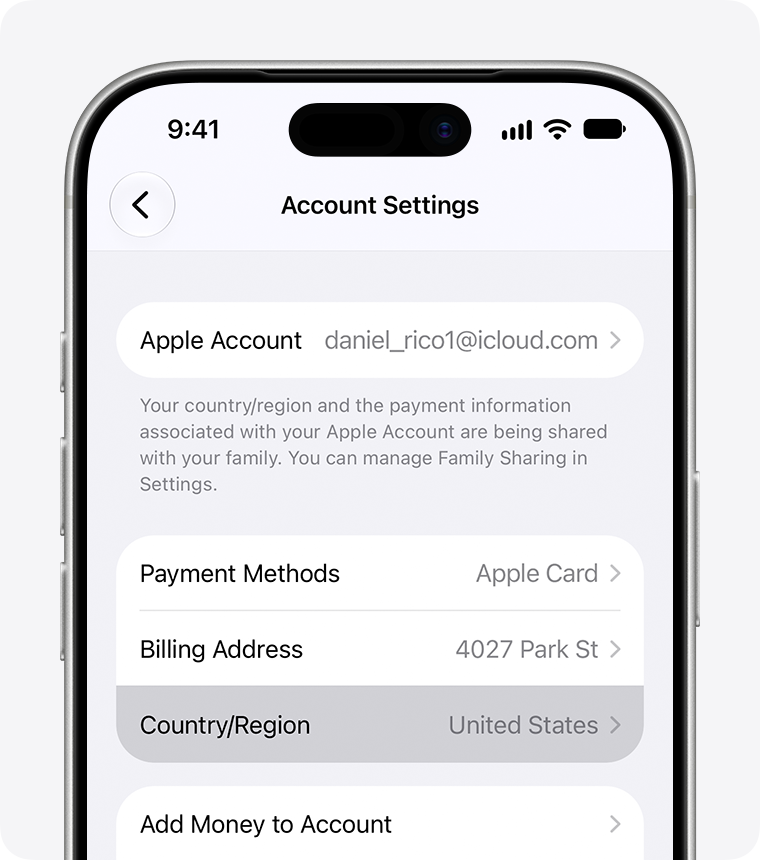
Choose Kazakhstan
Select Kazakhstan, tap Continue if shown, and accept Apple’s terms. Apple may require a valid payment method for Kazakhstan.
If Apple offers None under Payment Method, select it for the free download. In Address and Phone, enter a random address and phone number in Kazakhstan from the internet. Tap Done.
T‑Journal describes this method for the US App Store. It may work differently for Kazakhstan.
Apple may block the switch if you have a remaining balance, certain active subscriptions, pending purchases or refunds, or Family Sharing.
Apple’s region-change instructionsInstall or update Dolgun VPN
Open the Kazakhstan listing below. Tap Get or the download icon to install Dolgun, or Update if it’s already installed and an update is offered. When the download finishes, tap Open.
Dolgun in the Kazakhstan App Store